

How to Use the Calculator 💉
1. Select your syringe size (units)
Choose the total number of units of your syringe (e.g., 30, 50, or 100 units).
2. Enter the peptide amount (mg)
Input the total amount of peptide in the vial.
3. Enter the bacteriostatic water (mL)
Add the amount of water used to reconstitute the peptide.
4. Enter your desired dose (mg)
Type in the dose you want to administer.
5. Click “Calculate”
The calculator will automatically display:
• the volume to inject (mL) 💧
• the number of units to use on your syringe 🧪
EXPLICATION DU TABLEAU CALCULATEUR DE PEPTIDE EN FRANCAIS
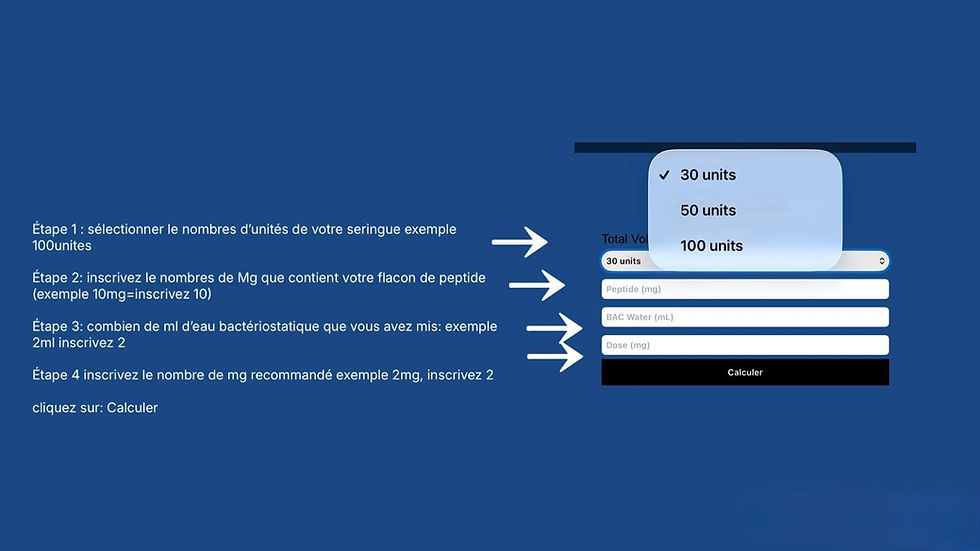
Comment utiliser le calculateur 💉
1. Sélectionnez la taille de la seringue (units)
Choisissez le nombre total d’unités de votre seringue (ex : 30, 50 ou 100 units).
2. Entrez la quantité de peptide (mg)
Indiquez la quantité totale de peptide présente dans le flacon.
3. Entrez le volume d’eau bactériostatique (mL)
Ajoutez le volume d’eau utilisé pour reconstituer le peptide.
4. Entrez la dose souhaitée (mg)
Inscrivez la dose que vous souhaitez administrer.
5. Cliquez sur “Calculer”
Le calculateur vous indiquera automatiquement :
• le volume à injecter (mL) 💧
• le nombre d’unités à utiliser sur votre seringue 🧪